
See where you are overspending on SaaS.
Finance knows what is being paid for software. Whether it is actually used, you can't see. According to Gartner, organizations without a central overview will overspend on SaaS by at least twenty-five percent through 2028. Mapit is that central overview, with usage next to spend for every app, so you can reduce licenses, cancel apps and get ahead of your renewals.
Gartner, Magic Quadrant for SaaS Management Platforms, June 18, 2026.
What Mapit gives you as Finance
Including the apps bought outside your view
Mapit finds what runs through the workspace and the browser, including apps a team arranged on its own. That is spend that currently is not brought together anywhere.
A usage figure under every expense
You pay per account. Mapit shows how many of those accounts still sign in, so reducing or cancelling is a decision based on numbers.
Decide before the contract renews
Add your contracts and you see what renews within ninety days, with the notice period and the usage next to it.
Negotiate with the numbers on the table
At renewal you see for each app how many people still sign in, next to the number of licenses you entered with the contract.
Where to start
Lower your license costs, stop paying for unused apps, save at renewal and see what a departing colleague keeps costing you.
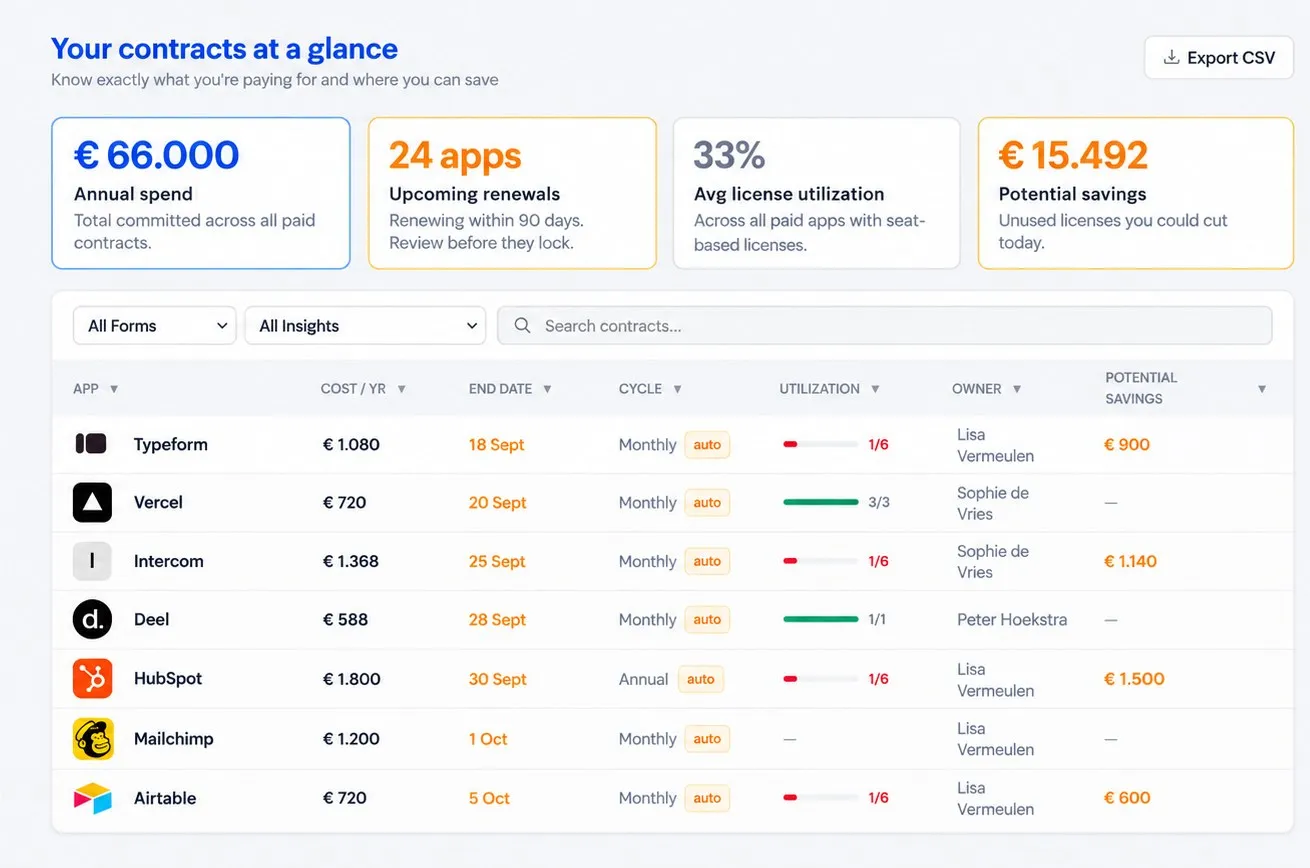
Connect and done: one connection to Google Workspace or Microsoft 365 plus a browser extension, no IT project. The overview stays accurate without anyone maintaining it. No lists, no credit card statements, no finance admin, no digging around.
Know with every invoice whether the app is still being used.
Frequently asked questions
How do costs and contracts get into Mapit?
You enter them yourself in Contract management. Mapit finds apps, users and usage automatically. After that, spend and usage are on the same screen.
Mapit doesn't know how many licenses we bought, does it?
What Mapit sees itself is how many people have access and how many of them still sign in. You enter the number of licenses purchased with the contract, and then the difference is on the same screen.
How soon do I get a first picture?
Right after connecting, you see which apps are running and how many users each app has. Export that list and put it next to your financial records to identify the most expensive apps and take action. After about two months you also see who no longer signs in.
Can several people look at it?
Yes. Finance, IT and Compliance work from the same overview, with a budget owner and a gatekeeper for every app.
What does Mapit see of our data?
We only look at metadata, not inside the apps themselves, and we host your data in the Netherlands. So: which apps are running, who has access and whether they are used, not the content of apps or files.