Your SaaS keeps growing.
Your control doesn't.

Once connected, you see which apps are running, who has access, and later whether that access is still being used.

  • Stop SaaS waste
  • Revoke forgotten access
  • A basis for your audits
  • Hosted in the Netherlands

Get started

Customers and partners

  • Alpine Hearing Protection
  • KPN Platform Vendor Partner
  • Enreach
  • Brandfirm
  • Golfpark Spandersbosch
  • Winc Academy
Sound familiar?

4 things that go wrong with your apps

Recognize one? Chances are the other three are happening too.

Shadow IT: apps nobody has consciously reviewed

Most apps live in your Google or Microsoft environment. It is just that hardly anyone looks at them. Others run in the browser with a work email and a separate password. Company data ends up in tools nobody is keeping track of.

Security: a former colleague still has access.

Someone leaves and their Microsoft or Google account is closed. But separate app accounts stay active, often for months. Nobody thinks to revoke them one by one. Every forgotten account is a risk.

Costs: paying for what nobody uses

Unused, duplicate and trial licenses quietly keep running. Through 2028, organizations without a central overview will overspend on SaaS by at least twenty-five percent.

Compliance: no up-to-date SaaS inventory

Which apps are running, and who has access? ISO 27001, GDPR and NIS2 all ask that first. A spreadsheet goes stale fast. A SaaS inventory should stay up to date.

Gartner, Magic Quadrant for SaaS Management Platforms, June 18, 2026.

What Mapit does

Mapit finds the apps your organization uses, including the ones nobody remembers anymore.

One connection to Google Workspace or Microsoft 365, plus a browser extension for the apps outside it. Your overview starts within minutes and is updated every night.

Mapit shows which apps are running, who has access to them and which ones are actually used. It finds them in two ways. Most are apps people open with their Google or Microsoft account, so Mapit sees them as soon as you connect, without installing anything. The rest are the everyday tools people sign in to with a separate login, outside your work environment. To find those too, your IT team pushes a browser extension to all browsers at once, with no manual action needed from anyone else. The overview fills in as people sign in to their apps. Together, those two channels make up your overview.

Read how it works ->

  • Hosted in the Netherlands
  • Metadata only
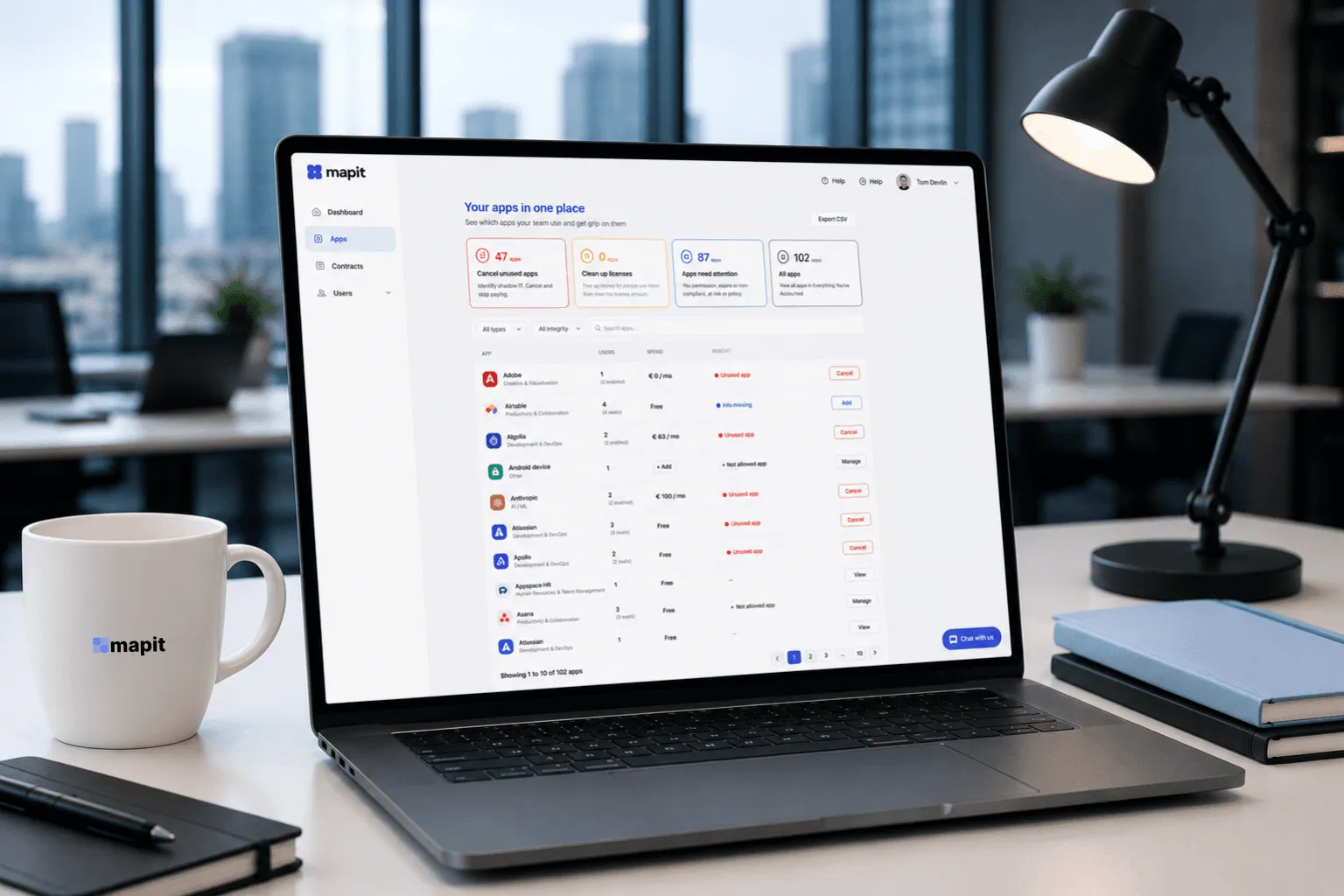
The Mapit app overview on a laptop
Action, not a report

You don't just see what's wrong. You act on it in one click.

Unlike a traditional report, our insight isn't a document to read through but a moment to act. One click and you step in, right from the overview.

How to start

Connect and go

Connected in five minutes. After that, your overview keeps growing.

  1. 01

    Connect your system

    Connect your Google Workspace or Microsoft 365. Done within 5 minutes. The browser extension goes out centrally to all devices; employees do not have to do anything.

  2. 02

    Get instant insight

    Mapit automatically discovers your SaaS tools and users.

  3. 03

    Optimize and save

    Cancel unused apps, remove users.

Features

Here is what it looks like

Only the tools you need. Nothing you don't.

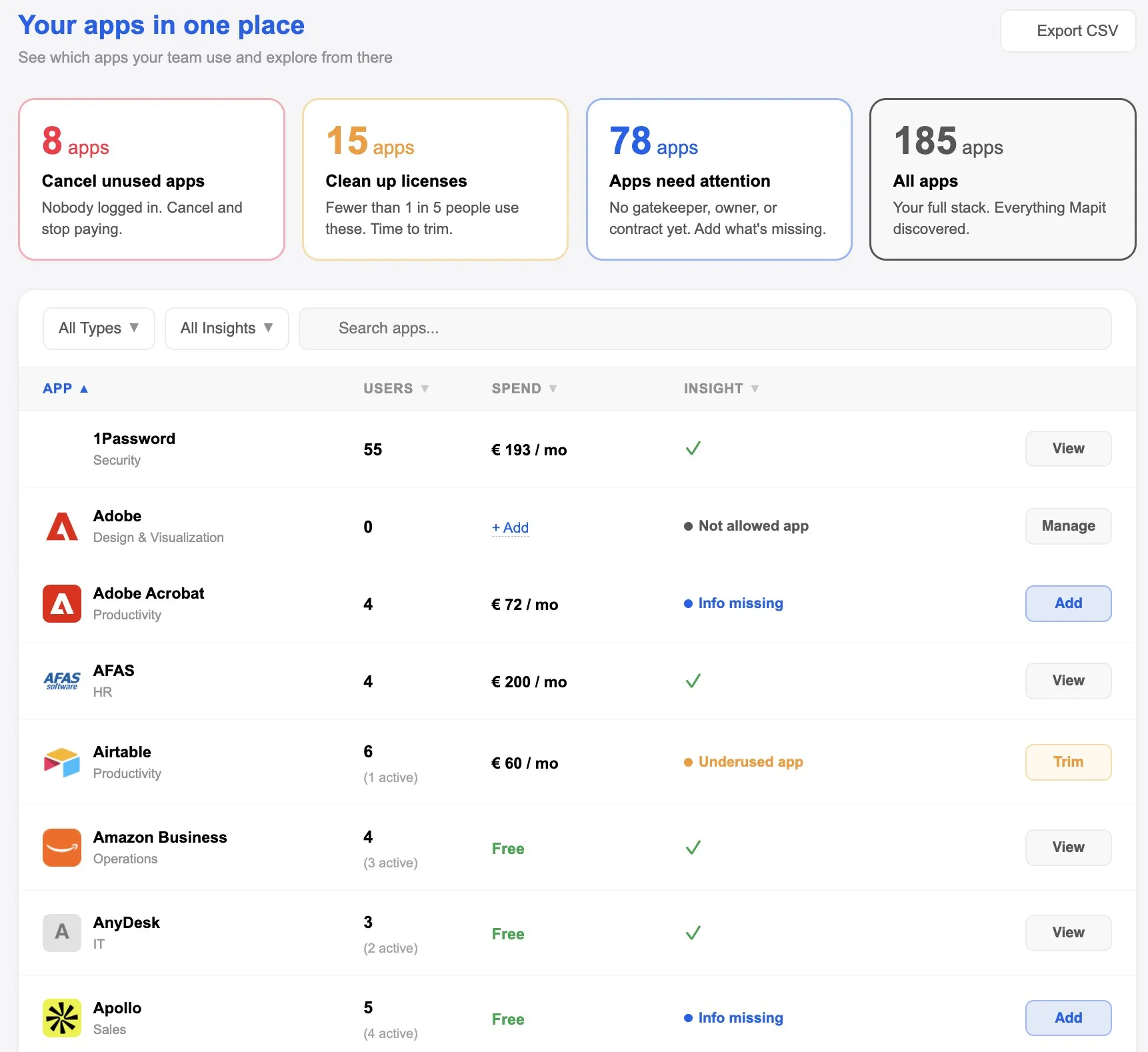
App management

Find risky, unused and duplicate tools, including the apps nobody has consciously reviewed.

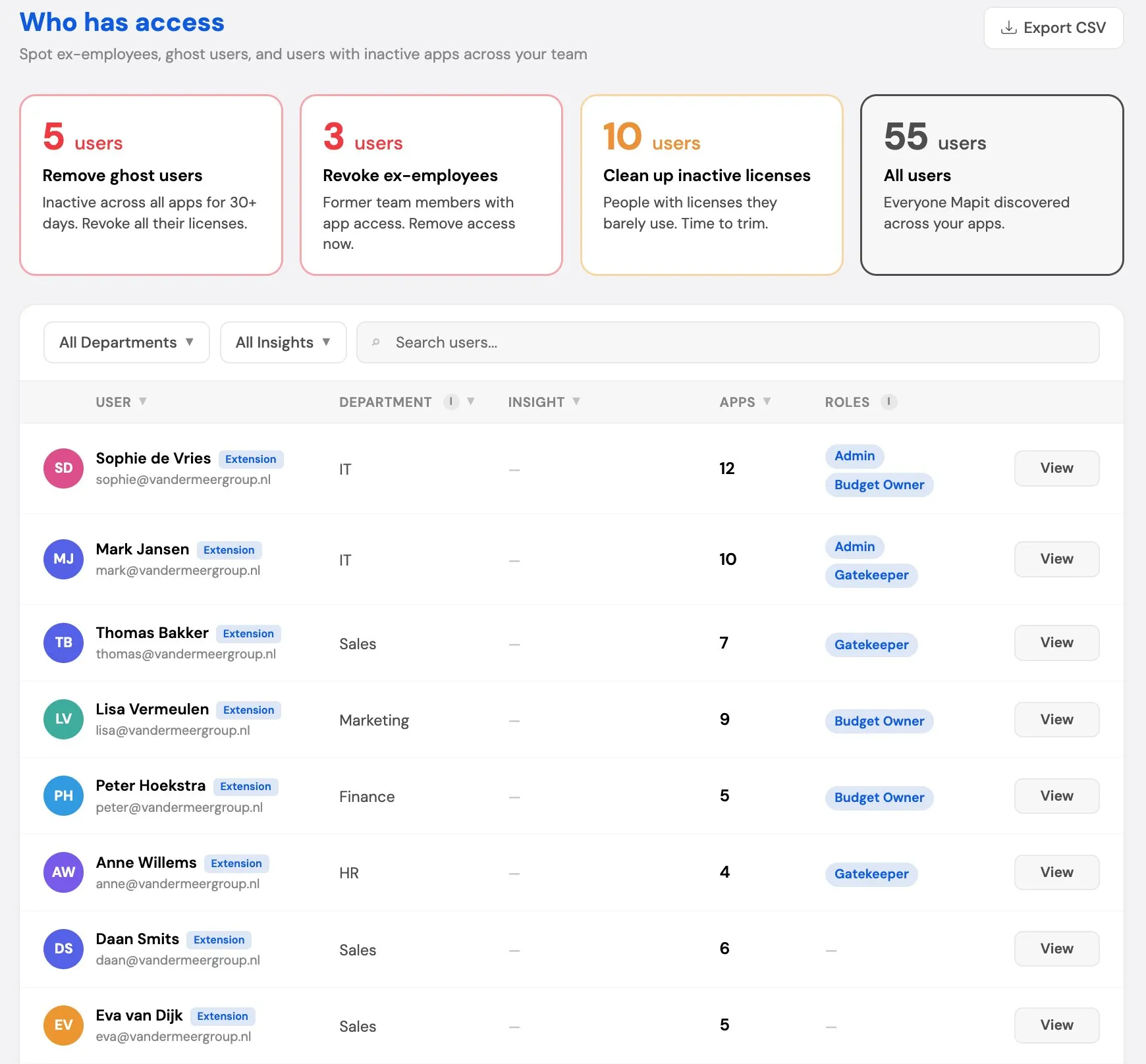
Access management

See who has access to which app, and revoke what no longer fits in one click.

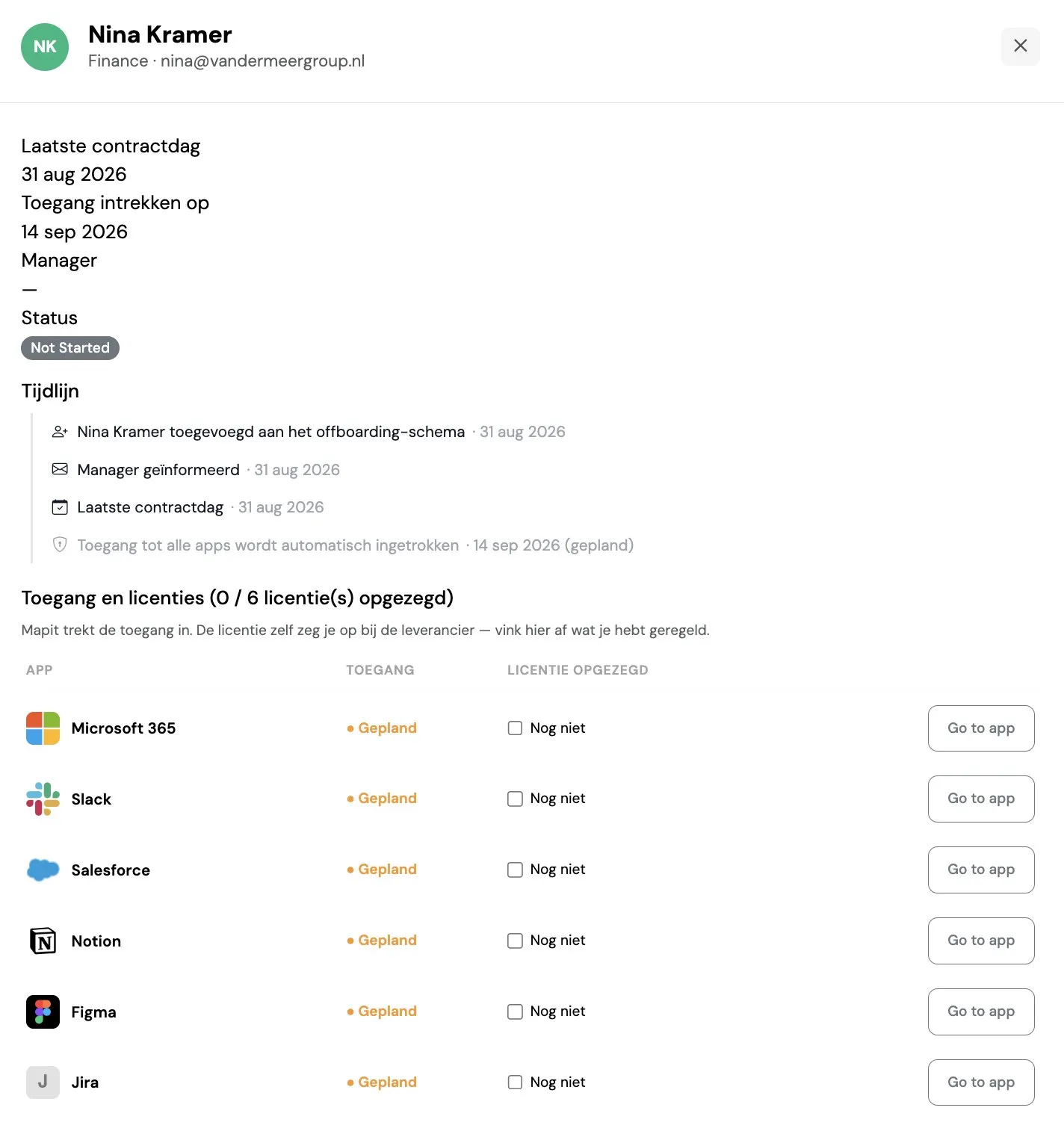
Offboarding

Someone leaving? Revoke their access in one go, or let Mapit do it automatically on their last day.

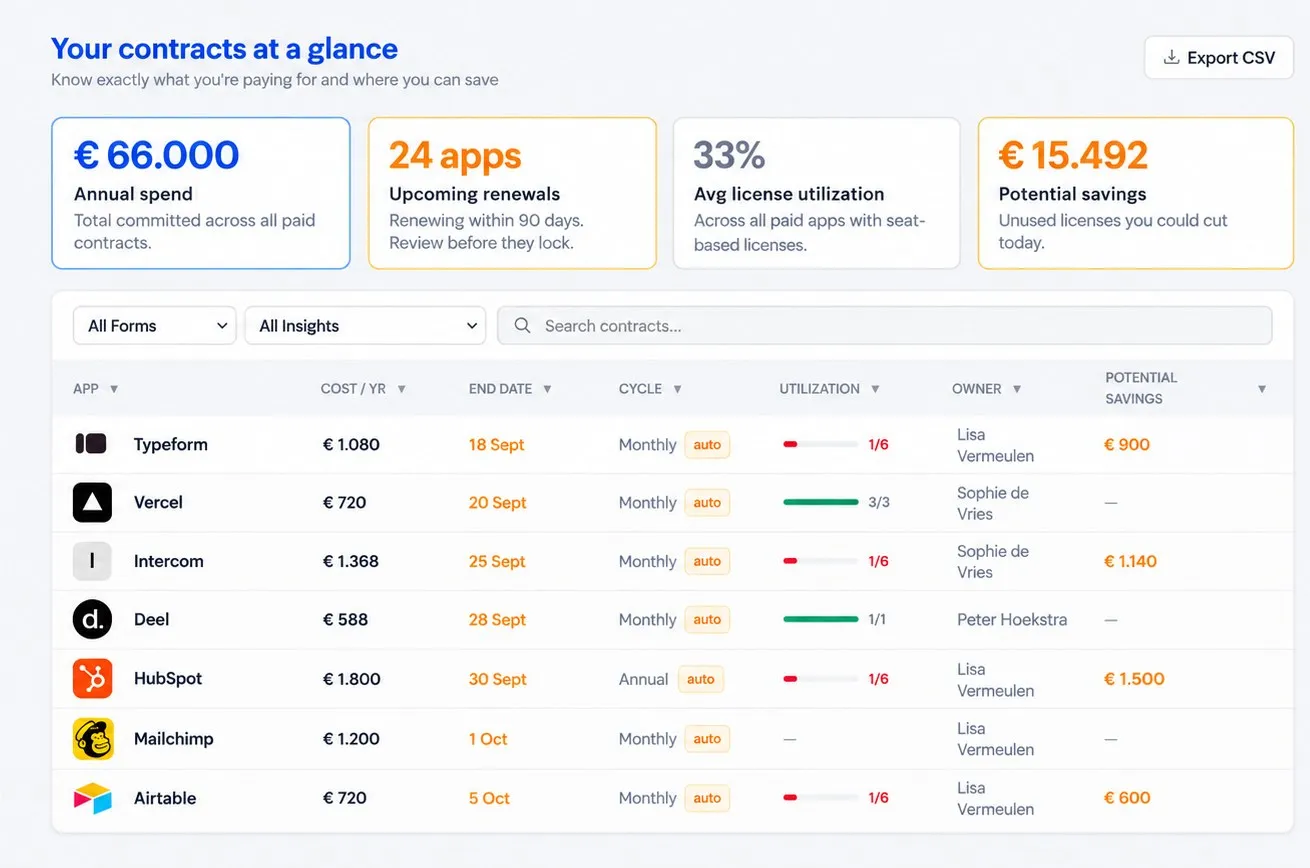
Contract management

Keep contracts, costs and renewals in one place. With reminders, so nothing quietly renews.

Customer stories

What teams say

We let our customers do the talking.

  • The biggest advantage of Mapit is minimal effort, real results. For me, it is mainly a way to monitor and lower SaaS costs without spending much time on it.

    Pieter B., CFO Alpine Hearing ProtectionPieter B., CFO Alpine Hearing Protection
  • At first we wanted to stop wasting money on apps, but monitoring app usage has made us more efficient.

    Emma H., COO Winc AcademyEmma H., COO Winc Academy
  • We immediately had an overview that quickly led to a significant reduction in SaaS costs. No more separate lists, no more guessing who uses what.

    Arvid G., Director Golfpark SpandersboschArvid G., Director Golfpark Spandersbosch
  • The onboarding and offboarding process not only saves time (money), but using the tool consistently has also helped us with our ISO 27001.

    Steve P., CIO EnreachSteve P., CIO Enreach
  • Having one overview of what happens with our apps, combined with monitoring subscriptions and managing access, makes Mapit part of our business process.

    Remco van de B., Co-owner BrandfirmRemco van de B., Co-owner Brandfirm
Meet the team

The people behind Mapit

Carla Snepvangers

Carla Snepvangers

Carla grew up in North Brabant and has lived in Amsterdam with her family for many years. She runs on coffee, cinnamon rolls and good conversations.

She is an entrepreneur, board member and investor with more than 25 years of experience building and scaling media and technology companies. In growing organizations she kept seeing the same pattern: as teams grew, more tools were added, but nobody owned the SaaS landscape as a whole. Finance and IT each saw part of it, but nobody had a shared overview, and when an overview did appear, it was soon out of date. For Carla, this is not about a lack of discipline. It is a natural result of growth.

Terry Aurik

Terry Aurik

Terry was born in Amsterdam and still lives nearby, with her husband and their dog, now that the kids have left home. She loves spending time with friends and family, and has a soft spot for licorice.

She has held C-level roles in the tech and telecom sector and has worked extensively on digital transformation and complex system landscapes. From that perspective, she saw how easily access to tools is granted as companies grow and roles change, and how rarely it is reviewed or cleaned up afterward. That is how forgotten access piles up: every dormant account is both a cost and a risk.

And that's why we started Mapit

We started Mapit because, from different angles, we kept running into the same problem. Organizations have lots of SaaS tools, but nobody has an up-to-date overview of which apps are running and who uses them. IT, Finance and HR each see part of it; nobody sees the whole picture. Mapit closes that gap: one shared, up-to-date overview to base decisions on, reduce risk and bring structure, without adding complexity.

Pricing

What does Mapit cost?

The price depends on the number of apps you want to manage. Not sure how many you have? Pick the closest option. After connecting, you can always upgrade or downgrade. Need integrations, personal onboarding or multiple workspaces? That's what Enterprise is for, regardless of the number of apps.

Roughly how many apps do you use?

Starter

See your apps and users

€99/mo

€83/mo, billed annually

Up to 100 apps included

  • Automatic discovery
  • Apps and users
  • Inactivity tracking
  • Revoke access
  • Export lists
  • Email support
  • Revoke access to unapproved apps

Most popular

Complete

Stay in control

€199/mo

€166/mo, billed annually

Up to 100 apps included

  • Everything in Starter
  • Contract management
  • Total spend overview
  • Offboarding
  • Multiple admins
  • DPA status
  • Basis for processing records

Enterprise

For when you need more

Custom

Tailored to your situation

  • Everything in Complete
  • Multiple workspaces
  • Integrations
  • Personal onboarding
  • Consulting
  • Consolidated dashboard
  • Google and Microsoft side by side

Starter

See your apps and users

€179/mo

€149/mo, billed annually

Up to 200 apps included

  • Automatic discovery
  • Apps and users
  • Inactivity tracking
  • Revoke access
  • Export lists
  • Email support
  • Revoke access to unapproved apps

Most popular

Complete

Stay in control

€329/mo

€274/mo, billed annually

Up to 200 apps included

  • Everything in Starter
  • Contract management
  • Total spend overview
  • Offboarding
  • Multiple admins
  • DPA status
  • Basis for processing records

Enterprise

For when you need more

Custom

Tailored to your situation

  • Everything in Complete
  • Multiple workspaces
  • Integrations
  • Personal onboarding
  • Consulting
  • Consolidated dashboard
  • Google and Microsoft side by side

Starter

See your apps and users

€239/mo

€199/mo, billed annually

Up to 400 apps included

  • Automatic discovery
  • Apps and users
  • Inactivity tracking
  • Revoke access
  • Export lists
  • Email support
  • Revoke access to unapproved apps

Most popular

Complete

Stay in control

€449/mo

€374/mo, billed annually

Up to 400 apps included

  • Everything in Starter
  • Contract management
  • Total spend overview
  • Offboarding
  • Multiple admins
  • DPA status
  • Basis for processing records

Enterprise

For when you need more

Custom

Tailored to your situation

  • Everything in Complete
  • Multiple workspaces
  • Integrations
  • Personal onboarding
  • Consulting
  • Consolidated dashboard
  • Google and Microsoft side by side

Enterprise

For when you need more

Custom

What's included

Tailored to your situation

  • Everything in Complete
  • Multiple workspaces
  • Integrations
  • Personal onboarding
  • Consulting
  • Consolidated dashboard
  • Google and Microsoft side by side

With annual billing, you get 2 months free.

All prices exclude VAT.

Frequently asked questions

Good to know

What is Mapit and what problem does it solve?

Mapit gives you an up-to-date overview of the apps in your organization and who uses them. Apps that sit in your work environment where nobody really looks, and the apps people use in the browser. With that overview, you can stop waste, close access gaps and keep an up-to-date SaaS inventory at hand.

How does Mapit work?

You connect your Google Workspace or Microsoft 365 once, and the browser extension is pushed to all Chrome and Edge browsers in one go. Employees don't have to do anything. Mapit discovers your apps and users and updates the overview every night. Connect, and you're ready to take control of your SaaS.

We have several workspaces, or Google and Microsoft side by side. Is that possible?

Yes. You connect every workspace, even if Google Workspace and Microsoft 365 run side by side, and see everything in one overview. There you see which tools do the same thing and where access is still open, so you can clean up. That is part of Enterprise. Email sales@mapit.nl and we will tailor it to your situation.

How does Mapit find apps that are not yet on your radar?

Through two channels. The Google or Microsoft connection registers apps people sign in to with those accounts. The browser extension registers apps people sign in to with a separate password.

What data does Mapit see?

Metadata only: which apps are running, who has access and how they are used. Not the content of apps or files.

How soon will I see my apps and users?

You have a first overview within minutes of connecting. After that, it is updated every night.

Does Mapit help with ISO 27001, GDPR and NIS2?

Yes. ISO 27001, GDPR and NIS2 all start with knowing which apps are in use and who has access. Mapit gives you that up-to-date overview as the basis for your audits and records. Policies, risk assessments and the rest stay with your organization.

What access does Mapit need, and is our data safe?

Connecting requires admin rights once; after that, Mapit has read-only access. The browser extension is pushed centrally from Microsoft Intune or the Google Admin Console. Employees do not have to install anything themselves. We only look at metadata, not inside the apps themselves, and we host your data in the Netherlands.

Am I locked into a contract?

No long-term contract. Choose monthly or annual billing and change whenever you like. Current terms at www.mapit.nl.

What do I pay for: users or apps?

Per organization, not per user. What you pay depends on how many apps Mapit tracks for you: up to 100, up to 200 or up to 400. The limit itself counts, so with exactly 100 apps you are still in 'Up to 100 apps'.

What happens if I go over my app limit?

You see how many apps were found, but the apps above your limit are shown masked.

How do I report a security issue?

We monitor our platform ourselves, but if you spot something, email security@mapit.nl. It goes straight to our whole team. Not sure it's really a problem? Report it anyway. If a data breach affects your organization's data, we'll inform you within the period set out in your data processing agreement.


Connect and done: one connection to Google Workspace or Microsoft 365 plus a browser extension, no IT project. The overview stays accurate without anyone maintaining it. No lists, no credit card statements, no finance admin, no digging around.

Get started today!

Work more securely and with less stress. See where money is leaking and prevent unwanted access.

Get started

The demo is on its way

We'd just like to know who's interested. Leave your name and email address and the demo will start.

If you'd like to see more without leaving your details, click here.

By clicking 'Send', you agree that Mapit processes your data. Not sure you want to leave your email address? We get it. You can unsubscribe at any time. See our privacy policy for more information.

Pricing

Price on request

More than 400 apps, or interested in Enterprise? Leave your details and we'll get back to you within one business day.

By clicking 'Send', you agree that Mapit processes your data. Not sure you want to leave your email address? We get it. You can unsubscribe at any time. See our privacy policy for more information.

Cookie settings

We use cookies to improve your experience and analyze website traffic. Read our Cookie policy.